Your old tablet, now the family hub on the fridge.
Klinth turns an old or cheap tablet into one always-on screen for the household: the week's plan, the grocery list, tonight's dinner and the notes nobody remembers.
No Google or Microsoft account. No password. Works on Wi-Fi only.
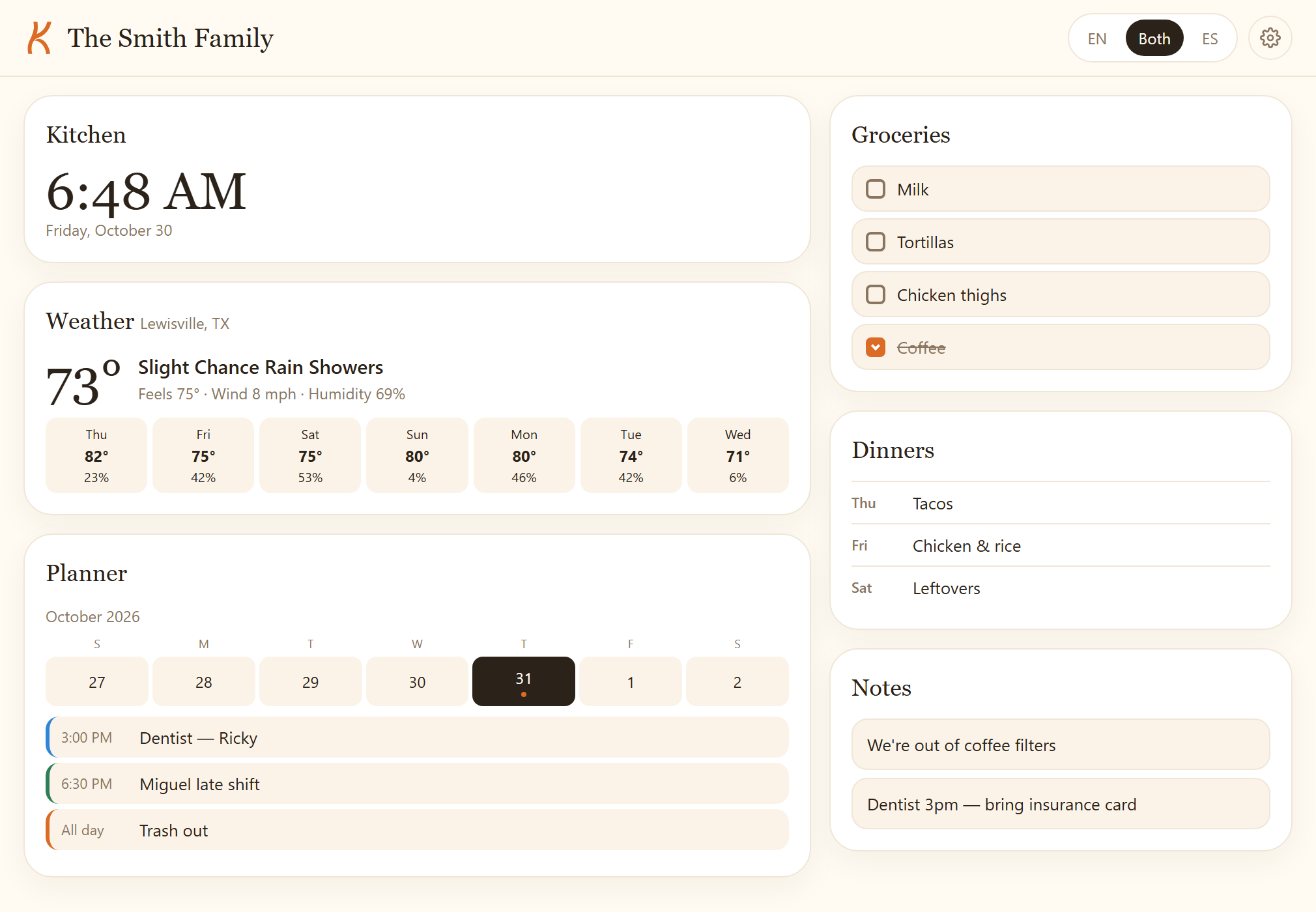
Everything the house needs on one screen
Not another app to check. One screen everyone walks past.
Shared groceries
Anyone adds, anyone ticks off. The list is the same on the tablet and every phone.
Week plan & dinners
Calendar and evening meals side by side. One button turns the week's dinners into the grocery list.
Notes that stick
Recipes, reminders, "we're out of coffee". Visible from across the room.
Weather at a glance
Today outside and the week ahead, from Anemlo. No separate weather app to open.
Always on
Built to stay open for weeks: keeps the screen awake, refreshes itself, recovers from sleep.
Two languages
English, Spanish, or both at once — labels are bilingual, not a setting you hunt for.
Private by design
Each hub has an unguessable address. No ads, no trackers, no data resale. Export or delete anytime.
Up and running in about 15 minutes
Five minutes, once.
Create your hub
You get a private address and sign in with a passkey — your fingerprint or screen lock. Nothing to remember.
Open it on the tablet
Add it to the home screen in Chrome. Plug the tablet in and it becomes the kitchen screen.
Everyone else joins
Share the link with the household. Anything added on a phone shows up on the tablet in seconds.
A web page, not another app
Nothing to download from an app store, nothing to update by hand.
Opens in the browser
Chrome, on any tablet or phone. Add it to the home screen and it looks like an app without being one.
No app store, no account
You sign in with a passkey — your fingerprint or screen lock. No Google, Apple or Microsoft account is involved.
Improvements arrive on their own
The hub reloads itself when a new version ships, so the screen in the kitchen is never a stale copy.
The optional fridge kit
You probably already own one. Anything from 2019 onwards is fine — Klinth is built for slow, low-memory devices on purpose.
Amazon Fire HD 10
~$140
Cheapest way in. Runs in the browser, so there is no app to install.
Samsung Galaxy Tab A11
~$128
The safe default. Bright screen, current Android, easy to mount.
Avoid no-name tablets under about $70 — the screens make text hard to read at a distance.
One simple price for the whole household
No tiers to compare. Cancel whenever.
Klinth
$3.99/month
or $34 a year — two months free
- Up to 6 devices
- Calendar, groceries, dinners, notes
- Synced to every phone in the house
- Export or delete your data anytime
14-day free trial
Set up the hub, use it for two weeks, then decide. No card during the beta.
Beta: hubs are invite-only right now, and payments are not switched on yet.
What it does not do
No two-way Google Calendar sync, no phone app, no ads, no analytics. If you need those, Klinth is not it yet — and that is deliberate.
Questions
Do I need a Google or Microsoft account?
No. You create a passkey (your device's fingerprint or screen lock) and that is the whole account.
Does it work without internet?
The tablet keeps showing the last saved state and you can keep adding items; they sync when the connection comes back. Weather and translation need the network.
Does it connect to Google Calendar?
Not yet. Read-only calendar import is planned, and it will stay one-way so Klinth never asks for access to your Google account.
What happens if I lose the hub link?
The address is random and not recoverable from a name. Save it as a bookmark, or add it to the tablet's home screen. We can look it up for you if you still have the passkey and your email.
Which tablets work?
Anything with a current Chrome from around 2019 onwards. Klinth is deliberately lightweight: no frameworks, one page, big touch targets.
Can I get my data out?
Yes — one click exports everything as JSON. Deleting a hub removes its rows, devices and credentials, not just a flag.
Give that old tablet a job.
Set up a hub in about fifteen minutes, then forget it is there.